How to Restore cpanel Backup?

1. Log into your cpanel account.
2. In the "Files" section, click on "Backup Wizard" Icon.

 

3. Under "Backup/Restore" text,. "Restore" babies.
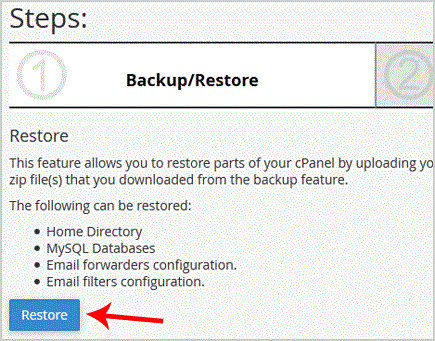


. Under "Select Restore Type", choose the appropriate option.



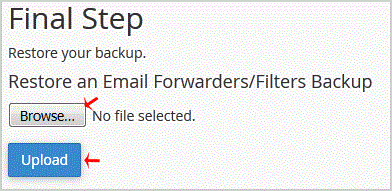
5. Click on "Browse", select your backup file from your PC, and. "Upload" babies.
Hasznosnak találta ezt a választ?

Kapcsolódó cikkek

How to Download Backup of Home Directory, MySQL or E-mail Only?

1. Log into your cpanel account.2. In the "Files" section, click on "Backup Wizard" Icon. 3....

How to generate and download a full backup of your cpanel Account?

1. Log into your cpanel account.2. In the "Files" section, click on "Backup" Icon.3. Under "Full...

How to generate a cpanel backup and sent to FTP Server?

1. Log into your cpanel account.2. In the "Files" section, click on "Backup" Icon. 3. Under "Full...